
Environment Configuration
环境配置的真实成本
大型项目依赖特定的语言版本、系统库、数据库、中间件和环境变量。即使代码本身没有问题,开发者也可能因为本地环境差异,在安装依赖、启动服务和复现问题上耗费大量时间。一个新成员加入团队,配置开发环境可能需要半天到两天
环境配置不是教程里的附属步骤,而是项目能否稳定运行的前提。当配置过程足够复杂时,能够把依赖、运行时和启动方式打包在一起的一键化方案就变得格外重要,Docker 也正是在这种需求下登场
一般情形
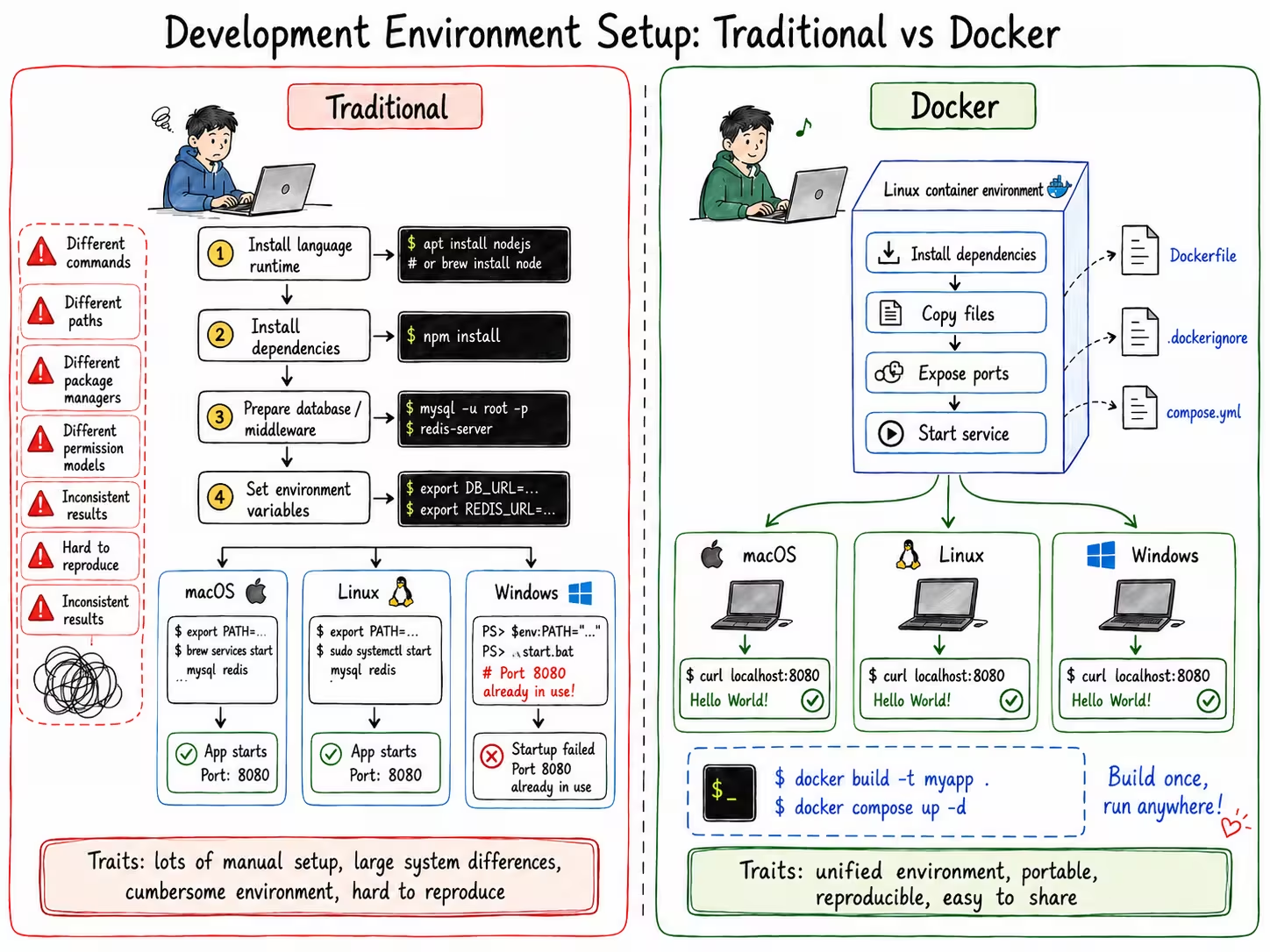
一般情况下,开发环境需要通过命令行一步一步配置:安装语言运行时、拉取依赖、准备数据库或中间件,再设置必要的环境变量
问题也常常出在这里。不同操作系统的命令、路径、包管理器和权限模型并不一致。macOS 和 Linux 的差异相对较小,而 Windows 往往需要另一套配置方式
这会让同一份教程在不同机器上出现不同结果。开发者不仅要理解项目本身,还要处理系统差异带来的额外细节,环境配置因此变得繁琐且难以复现
Docker情形
如果仍然使用命令行配置环境,Linux 往往是更自然的选择。它对命令行、包管理和服务编排有更完整的支持,也更接近许多服务器的真实运行环境
Docker 的思路是把这套 Linux 环境封装进容器中,并把安装依赖、复制文件、暴露端口和启动服务等步骤写入配置文件。常见文件包括 Dockerfile、.dockerignore 和 compose.yml
这样一来,开发者不必在每台机器上重复手动配置环境,而是可以统一使用 docker 命令构建和启动项目。只要配置文件保持一致,环境就更容易迁移、复现和分享
Dockerfile
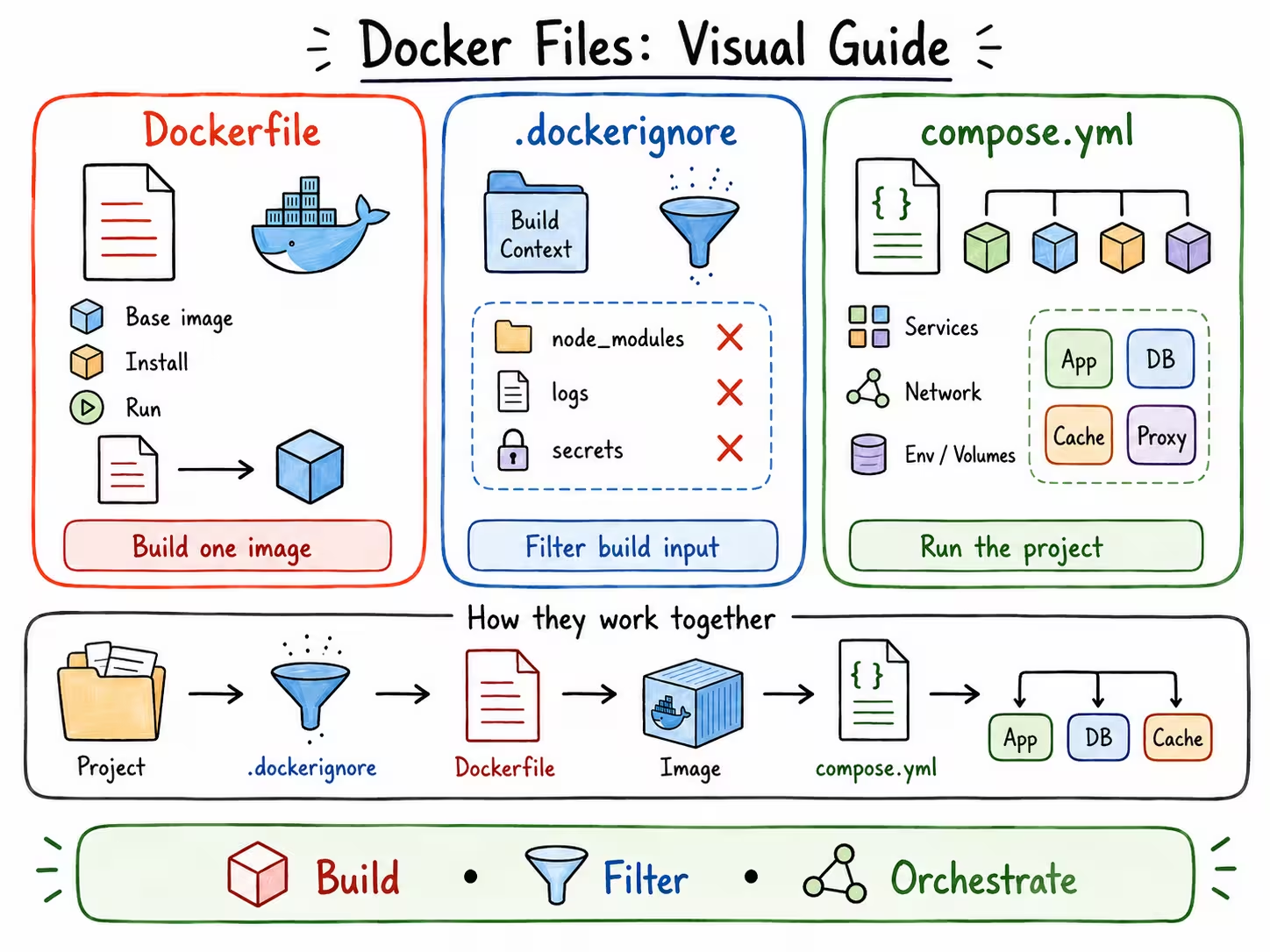
Dockerfile 用来描述一个镜像如何被构建。它相当于把”从一台干净机器开始配置项目环境”的过程写成可重复执行的脚本
一个 Dockerfile 通常会先选择基础镜像,例如某个 Linux 发行版、Node.js、Python、Rust 或 Nginx 环境。基础镜像决定了容器最初拥有的系统能力和运行时版本
随后,Dockerfile 会继续写入安装依赖、复制项目文件、设置工作目录、暴露端口和指定启动命令等步骤。每一步都对应前文中手动配置环境时容易出错的环节
最小化示例
一个典型的 Node.js 应用 Dockerfile:
FROM node:22-alpine
WORKDIR /app

# 先复制依赖文件,利用 Docker 缓存
COPY package*.json ./
RUN npm ci --omit=dev

# 再复制源码
COPY . .

EXPOSE 3000
USER node
CMD ["node", "server.js"]
这个最小示例展示了核心流程:选择基础镜像 → 安装依赖 → 复制代码 → 启动服务。Dockerfile 解决的是"项目需要怎样的单个运行环境"这一问题
关键指令说明
- FROM - 指定基础镜像(Node.js、Python、Rust 等)
- WORKDIR - 设置工作目录
- COPY - 复制文件到镜像
- RUN - 构建时执行命令(安装依赖)
- EXPOSE - 声明服务端口
- USER - 指定运行用户(安全最佳实践)
- CMD - 容器启动命令
完整指令参考和生产级配置见文末附录 A
.dockerignore
.dockerignore 用来控制哪些文件不应该被发送给 Docker 构建过程。它的作用类似 .gitignore,但服务对象是镜像构建,而不是 Git 提交
在构建镜像时,Docker 会把项目目录作为构建上下文传给构建器。如果不加限制,node_modules、日志、缓存、测试产物、本地密钥等文件都可能被一起传入
这会带来两个问题:一是构建上下文变大,镜像构建变慢;二是本地无关文件甚至敏感信息可能进入镜像,影响环境的纯净性和安全性
所以,.dockerignore 负责保持构建输入干净。它让 Dockerfile 只接触真正需要的项目文件,从而减少本地环境对容器环境的干扰
# 依赖目录:通常应在镜像中重新安装,避免把本地环境带进去
node_modules
vendor
.venv
venv

# 构建产物:由构建流程生成,不应作为构建输入
dist
build
out
target
coverage

# 缓存目录:会增大构建上下文,也容易造成不可复现结果
.cache
.next
.nuxt
.turbo
.vite
.pytest_cache
__pycache__

# 日志和临时文件:与项目运行环境无关
*.log
tmp
temp
.DS_Store

# 本地配置和密钥:避免敏感信息进入镜像
.env
.env.*
*.pem
*.key
*.crt

# 版本控制和编辑器配置:通常不参与镜像构建
.git
.gitignore
.github
.vscode
.idea
compose.yml
Dockerfile 更关注单个镜像,而 compose.yml 更关注多个服务如何一起运行。对于真实项目来说,应用本身往往还依赖数据库、缓存、消息队列或反向代理
compose.yml 可以把这些服务写成一组声明式配置。例如,它可以定义应用服务使用哪个镜像或 Dockerfile,数据库使用哪个版本,服务之间如何联网,以及端口如何映射到宿主机
它还可以集中管理环境变量、数据卷和启动依赖关系。这样一来,原本需要分别启动的多个命令,就可以收束为一次 docker compose up
因此,compose.yml 解决的是“项目整体如何被拉起”这一问题。它把多个容器组织成一个可复现的开发环境,让项目不再只依赖开发者手动记住启动顺序
# services 定义一组需要协同运行的容器
services:
  # app 是应用服务,通常由当前项目的 Dockerfile 构建
  app:
    # build 指定镜像构建上下文和 Dockerfile 位置
    build:
      context: .
      dockerfile: Dockerfile

    # image 给构建出的镜像命名,便于复用和推送
    image: env-config-app:latest

    # container_name 指定容器名称,方便本地调试时识别
    container_name: env-config-app

    # ports 把宿主机端口映射到容器端口
    ports:
      - "3000:3000"

    # environment 声明容器运行时环境变量
    environment:
      NODE_ENV: production
      DATABASE_URL: postgres://app:password@db:5432/app
      REDIS_URL: redis://redis:6379

    # env_file 从文件读取环境变量,适合放本地配置
    env_file:
      - .env

    # volumes 挂载目录或命名卷,用于持久化数据或同步源码
    volumes:
      - ./src:/app/src
      - app-data:/app/data

    # depends_on 声明启动依赖,表示 app 会在 db 和 redis 之后启动
    depends_on:
      - db
      - redis

    # networks 指定服务加入的网络,服务之间可用服务名互相访问
    networks:
      - app-network

    # restart 定义容器异常退出后的重启策略
    restart: unless-stopped

  # db 是数据库服务,真实项目常用 PostgreSQL、MySQL 或 MongoDB
  db:
    image: postgres:16-alpine
    environment:
      POSTGRES_DB: app
      POSTGRES_USER: app
      POSTGRES_PASSWORD: password
    volumes:
      - db-data:/var/lib/postgresql/data
    networks:
      - app-network

  # redis 是缓存服务,应用可通过 redis:6379 访问它
  redis:
    image: redis:7-alpine
    networks:
      - app-network

# volumes 定义命名卷,避免数据库和应用数据随容器删除而丢失
volumes:
  app-data:
  db-data:

# networks 定义服务间通信网络
networks:
  app-network:
Docker 文件总结
简单来说,Dockerfile 定义镜像如何生成,.dockerignore 定义构建时应该忽略什么,compose.yml 定义多个容器如何协同运行
三者合在一起,就把前文中分散、易错、依赖操作系统差异的环境配置,变成了可以随项目版本管理的配置文件。这也是 Docker 能实现一键部署和环境复现的关键
从简单到复杂
理解了三个配置文件的作用后,让我们看看如何逐步构建一个真实的开发环境
第一步:单服务应用
最简单的场景 —— 只需要应用本身:
# compose.yml
services:
  app:
    build: .
    ports: ["3000:3000"]
第二步:添加数据库
真实项目通常需要 PostgreSQL 或 MySQL:
services:
  app:
    build: .
    ports: ["3000:3000"]
    depends_on: [db]
    environment:
      DATABASE_URL: postgres://app:password@db:5432/app

  db:
    image: postgres:16-alpine
    environment:
      POSTGRES_PASSWORD: password
    volumes:
      - db-data:/var/lib/postgresql/data

volumes:
  db-data:
第三步:生产级配置
添加健康检查、重启策略、非 root 用户等最佳实践。完整示例见下一节
实战:Python + CUDA 开发环境
前面介绍的是 Docker 文件各自负责什么,这一节把它们落到一个更具体的开发环境中:用 Docker 固化 Python、CUDA、PyTorch、uv、常用命令行工具和交互式 Shell,方便之后在新机器上快速复用
设计思路
这个环境主要面向需要训练或调试模型的项目。核心特点:
- 双路径支持 - 同时保留 CUDA 和 CPU 两条构建路径,有 GPU 时用 CUDA 镜像,没有 GPU 时用 CPU 镜像
- 多阶段构建 - 根据
BACKEND参数选择不同的基础镜像(base-cuda或base-cpu) - 开发工具集成 - 包含 zsh、Oh My Zsh、fzf、ripgrep、vim 等提升开发体验的工具
- 安全实践 - 使用非 root 用户运行容器
关键实现
基础镜像选择:
# CUDA 路径
FROM nvidia/cuda:${CUDA_VER}-cudnn-runtime-ubuntu${UBUNTU_VER} AS base-cuda

# CPU 路径
FROM python:${PY_VER}-slim AS base-cpu

# 统一入口
FROM base-${BACKEND} AS app-base
依赖管理:
使用 uv 作为包管理器,根据后端类型自动选择 PyTorch 索引:
# 根据 UV_EXTRA 选择 PyTorch 索引
case "${UV_EXTRA}" in
    cpu|cu126|cu128|cu129)
        PYTORCH_INDEX_URL="https://download.pytorch.org/whl/${UV_EXTRA}"
        ;;
esac

uv pip install --index-url "${PYTORCH_INDEX_URL}" torch torchvision
开发环境配置:
开发阶段(dev stage)安装额外工具并配置 shell 环境,提供接近本地开发的体验
使用方式
复用时只需要把配置文件放进项目,按机器情况选择启动方式:
# GPU 环境
docker compose --profile gpu run --rm trainer-cuda

# CPU 环境
docker compose --profile cpu run --rm trainer-cpu
启动后进入配置好的 zsh 环境,所有依赖已安装完成,可以直接开始开发或训练
配置调整
如果需要调整 CUDA、Python 或 uv 版本,优先修改 compose.yml 中的构建参数:
build:
  args:
    CUDA_VER: ${CUDA_VER:-12.8.0}
    PY_VER: ${PY_VER:-3.12}
    UV_VERSION: ${UV_VERSION:-0.11.10}
这样 Dockerfile 可以保持通用,具体机器差异集中在 compose 或环境变量中管理
完整的 Dockerfile、.dockerignore 和 compose.yml 配置见附录 B
总结
Docker 把分散、易错的环境配置变成了可版本管理的配置文件:
- Dockerfile 定义单个镜像如何构建
- .dockerignore 保持构建输入干净
- compose.yml 编排多服务协同
这不仅解决了"在我的机器上能跑"的问题,更重要的是让环境配置成为项目的一部分,而不是口口相传的隐性知识。新成员加入团队时,不再需要花费数小时配置环境,只需要一条命令就能获得与团队其他成员完全一致的开发环境
附录 A:Dockerfile 完整指令参考
# ARG 声明构建参数,只在镜像构建阶段生效
ARG NODE_VERSION=22

# FROM 指定基础镜像,是 Dockerfile 的构建起点
FROM node:${NODE_VERSION}-alpine

# LABEL 写入镜像元数据,常用于作者、版本和项目说明
LABEL maintainer="example@example.com"

# ENV 声明环境变量,构建和运行阶段都可以读取
ENV NODE_ENV=production

# WORKDIR 设置后续命令的默认工作目录
WORKDIR /app

# COPY 把宿主机项目文件复制到镜像中
COPY package*.json ./

# ADD 也可以复制文件,并支持自动解压本地压缩包和拉取远程 URL
# 一般复制普通项目文件时优先使用 COPY,语义更清晰
# ADD ./assets.tar.gz /app/assets/

# RUN 在构建镜像时执行命令,并把结果写入镜像层
RUN npm ci --omit=dev

# 再复制完整源码,便于前面的依赖安装层复用缓存
COPY . .

# EXPOSE 声明容器内服务监听的端口,主要用于文档说明和工具识别
EXPOSE 3000

# VOLUME 声明容器中的持久化目录,适合保存数据、日志或上传文件
VOLUME ["/app/data"]

# USER 指定后续命令和容器启动时使用的用户
USER node

# HEALTHCHECK 定义容器健康检查命令,便于编排工具判断服务状态
HEALTHCHECK --interval=30s --timeout=3s CMD wget -qO- http://localhost:3000/health || exit 1

# ENTRYPOINT 指定容器启动入口,适合固定主程序
# CMD 常作为 ENTRYPOINT 的默认参数,也可以在 docker run 时覆盖
# ENTRYPOINT ["node"]
# CMD ["server.js"]

# CMD 指定容器启动后的默认命令
CMD ["node", "server.js"]
附录 B:生产级 Python + CUDA 开发环境
完整的 Dockerfile、.dockerignore 和 compose.yml 配置,支持 GPU 和 CPU 双模式
# Select the specific cuda version (see https://hub.docker.com/r/nvidia/cuda/)
ARG CUDA_VER=12.8.0
# Adapt the PyTorch wheel index to fit the backend (one of [cpu, cu126, cu128, cu129])
ARG UV_EXTRA=cu128
ARG PYTORCH_INDEX_URL=
ARG BACKEND=cuda

ARG UBUNTU_VER=24.04
ARG PY_VER=3.12
ARG UV_VERSION=0.11.10
ARG UV_HTTP_TIMEOUT=300
ARG UV_HTTP_RETRIES=10
ARG UV_CONCURRENT_DOWNLOADS=2

# Create non-root user early for security
ARG USERNAME=prism
ARG USER_UID=1000
ARG USER_GID=1000

################################################
# Base stage per backend
################################################

# --- CUDA (x86_64) ---
FROM nvidia/cuda:${CUDA_VER}-cudnn-runtime-ubuntu${UBUNTU_VER} AS base-cuda
# let the package manager in Debian/Ubuntu not ask for user input during installation
ENV DEBIAN_FRONTEND=noninteractive

# Install system dependencies in a single layer with cleanup
RUN --mount=type=cache,target=/var/cache/apt,sharing=locked \
    --mount=type=cache,target=/var/lib/apt,sharing=locked \
    set -eux \
    && rm -f /etc/apt/apt.conf.d/docker-clean \
    && echo 'Binary::apt::APT::Keep-Downloaded-Packages "true";' >/etc/apt/apt.conf.d/keep-cache \
    && apt-get update \
    && apt-get install -y --no-install-recommends \
        python3-pip \
        python3-dev \
        python3-venv \
        pipx \
        git \
        ca-certificates \
        curl \
    && apt-get clean \
    && rm -rf /var/lib/apt/lists/*

# --- CPU-only (portable x86_64) ---
FROM python:${PY_VER}-slim AS base-cpu
ENV UV_EXTRA=cpu

# Install system dependencies in a single layer with cleanup
RUN --mount=type=cache,target=/var/cache/apt,sharing=locked \
    --mount=type=cache,target=/var/lib/apt,sharing=locked \
    set -eux \
    && rm -f /etc/apt/apt.conf.d/docker-clean \
    && echo 'Binary::apt::APT::Keep-Downloaded-Packages "true";' >/etc/apt/apt.conf.d/keep-cache \
    && apt-get update \
    && apt-get install -y --no-install-recommends \
        python3-venv \
        pipx \
        git \
        ca-certificates \
        curl \
    && apt-get clean \
    && rm -rf /var/lib/apt/lists/*

##################################################
# Shared app base stage
###################################################

FROM base-${BACKEND} AS app-base

ARG PY_VER
ARG BACKEND
ARG USERNAME
ARG USER_UID
ARG USER_GID
ARG UV_VERSION
ARG UV_EXTRA
ARG PYTORCH_INDEX_URL
ARG UV_HTTP_TIMEOUT
ARG UV_HTTP_RETRIES
ARG UV_CONCURRENT_DOWNLOADS

ENV BACKEND=${BACKEND} \
    DEBIAN_FRONTEND=noninteractive \
    PYTHONDONTWRITEBYTECODE=1 \
    PYTHONUNBUFFERED=1 \
    UV_CACHE_DIR=/tmp/uv-cache \
    UV_HTTP_TIMEOUT=${UV_HTTP_TIMEOUT} \
    UV_HTTP_RETRIES=${UV_HTTP_RETRIES} \
    UV_CONCURRENT_DOWNLOADS=${UV_CONCURRENT_DOWNLOADS} \
    HF_HOME=/app/.cache/huggingface \
    TORCH_HOME=/app/.cache/torch

# Install specific uv version with pipx (PEP 668 compatible). Keep the pipx
# home outside /root so the non-root runtime user can execute uv.
RUN PIPX_HOME=/opt/pipx PIPX_BIN_DIR=/usr/local/bin pipx install uv==${UV_VERSION} \
    && chmod -R a+rX /opt/pipx

# Create non-root user (or use existing user)
RUN set -eux; \
    if getent group "${USER_GID}" >/dev/null 2>&1; then \
        echo "Group ${USER_GID} already exists"; \
    else \
        groupadd -g ${USER_GID} ${USERNAME}; \
    fi; \
    if id -u ${USER_UID} >/dev/null 2>&1; then \
        echo "User ${USER_UID} already exists, using existing user"; \
    else \
        useradd -m -u ${USER_UID} -g ${USER_GID} ${USERNAME}; \
    fi; \
    mkdir -p /app /home/${USERNAME}/.cache; \
    chown -R ${USER_UID}:${USER_GID} /app /home/${USERNAME}

# Create directories used by bind mounts and model caches.
RUN mkdir -p /app/data /app/logs /app/.cache/huggingface /app/.cache/torch \
    && chown -R ${USER_UID}:${USER_GID} /app/data /app/logs /app/.cache \
    && chmod 755 /app/data /app/logs /app/.cache

# Set working directory
WORKDIR /app

# Copy dependency files first for better caching
COPY --chown=${USER_UID}:${USER_GID} requirements.txt README.md ./

# Install Python dependencies in a project virtual environment.
# Docker selects the PyTorch index from UV_EXTRA so CPU and CUDA builds install
# the right torch/torchvision wheels without hard-coding a CUDA index in requirements.txt.
RUN --mount=type=cache,target=/tmp/uv-cache \
    set -eux; \
    uv venv --seed /opt/venv; \
    if [ -z "${PYTORCH_INDEX_URL}" ]; then \
        case "${UV_EXTRA}" in \
            cpu|cu126|cu128|cu129) PYTORCH_INDEX_URL="https://download.pytorch.org/whl/${UV_EXTRA}" ;; \
            *) echo "Unsupported UV_EXTRA=${UV_EXTRA}. Use one of: cpu, cu126, cu128, cu129." >&2; exit 1 ;; \
        esac; \
    fi; \
    uv pip install --python /opt/venv/bin/python --index-url "${PYTORCH_INDEX_URL}" "torch>=2.0.0" "torchvision>=0.15.0"; \
    uv pip install --python /opt/venv/bin/python -r requirements.txt

# Switch to non-root user for application runtime
USER ${USER_UID}:${USER_GID}

# Copy application code
COPY --chown=${USER_UID}:${USER_GID} . .

# Ensure the source tree is available from /app
ENV PATH=/opt/venv/bin:$PATH \
    PYTHONPATH=/app:${PYTHONPATH:-}

##############################################################
# App stages
##############################################################

# Development stage
FROM app-base AS dev
USER root

# Install development tools
RUN --mount=type=cache,target=/var/cache/apt,sharing=locked \
    --mount=type=cache,target=/var/lib/apt,sharing=locked \
    apt-get update \
    && apt-get install -y --no-install-recommends \
        zsh \
        ripgrep \
        fd-find \
        vim \
        htop \
        strace \
        gdb \
    && apt-get clean \
    && rm -rf /var/lib/apt/lists/*

ENV HOME=/home/${USERNAME}
USER ${USER_UID}:${USER_GID}

# Install fzf from upstream so zsh integration supports `fzf --zsh`.
RUN set -eux; \
    git clone --depth=1 https://github.com/junegunn/fzf.git "${HOME}/.fzf"; \
    "${HOME}/.fzf/install" --bin --key-bindings --completion --no-update-rc

# Install Oh My Zsh and third-party plugins in their default Oh My Zsh
# custom plugin locations.
RUN set -eux; \
    git clone --depth=1 https://github.com/ohmyzsh/ohmyzsh.git "${HOME}/.oh-my-zsh"; \
    git clone --depth=1 https://github.com/zsh-users/zsh-syntax-highlighting.git \
        "${HOME}/.oh-my-zsh/custom/plugins/zsh-syntax-highlighting"; \
    git clone --depth=1 https://github.com/zsh-users/zsh-autosuggestions.git \
        "${HOME}/.oh-my-zsh/custom/plugins/zsh-autosuggestions"

# Install Vim color schemes under the default user Vim directory.
RUN set -eux; \
    mkdir -p "${HOME}/.vim/pack/themes/start"; \
    git clone --depth=1 https://github.com/tomasr/molokai.git \
        "${HOME}/.vim/pack/themes/start/molokai"

# Configure zsh, fzf and vim for a better interactive developer experience
RUN set -eux; \
    printf '%s\n' \
        'set nocompatible " Disable vi compatibility mode' \
        'syntax on " Enable syntax highlighting' \
        '' \
        'colorscheme molokai " Set the color scheme' \
        'set cursorline " Highlight the current line' \
        'set ruler " Show the cursor position ruler' \
        'set shiftwidth=4 " Use 4 spaces for << and >> indentation' \
        'set softtabstop=4 " Delete 4 spaces at a time with backspace' \
        'set tabstop=4 " Set tab width to 4 spaces' \
        'set nobackup " Do not create backup files when overwriting files' \
        'set autochdir " Change working directory to the current file directory' \
        'filetype plugin indent on " Enable filetype plugins and indentation' \
        'set backupcopy=yes " Overwrite files when creating backups' \
        'set ignorecase smartcase " Ignore case unless the search contains uppercase letters' \
        'set nowrapscan " Do not wrap searches around file boundaries' \
        'set incsearch " Show search matches while typing' \
        'set hlsearch " Highlight search matches' \
        'set noerrorbells " Disable error bells' \
        'set novisualbell " Disable visual bells' \
        'silent! set t_vb= " Clear the terminal visual bell code' \
        '" set showmatch " Briefly jump to the matching bracket when inserting brackets' \
        '" set matchtime=2 " Duration for matching bracket jumps' \
        'set magic " Enable magic pattern matching' \
        'set hidden " Allow switching buffers with unsaved changes' \
        'if exists("&guioptions")' \
        '    set guioptions-=T " Hide the toolbar' \
        '    set guioptions-=m " Hide the menu bar' \
        'endif' \
        'set smartindent " Enable smart indentation for new lines' \
        'set backspace=indent,eol,start' \
        '" Allow backspace and Delete to remove line breaks in insert mode' \
        'set cmdheight=1 " Set command-line height to 1 row' \
        'set laststatus=2 " Always show the status line' \
        'set statusline=\ %<%F[%1*%M%*%n%R%H]%=\ %y\ %0(%{&fileformat}\ %{&encoding}\ %c:%l/%L%)\ ' \
        '" Configure status line content' \
        'set foldenable " Enable folding' \
        'set foldmethod=syntax " Use syntax-based folding' \
        'set foldcolumn=0 " Set fold column width' \
        'setlocal foldlevel=1 " Set fold level' \
        '" set foldclose=all " Automatically close folds' \
        '" nnoremap <space> @=((foldclosed(line(".")) < 0) ? "zc" : "zo")<CR>' \
        '" Toggle folds with the space key' \
        '" Map ESC to two j key presses' \
        'inoremap jj <Esc>' \
        > "${HOME}/.vimrc"; \
    printf '%s\n' \
        '# Path to your Oh My Zsh installation.' \
        'export ZSH="$HOME/.oh-my-zsh"' \
        '' \
        '# Set name of the theme to load --- if set to "random", it will' \
        '# load a random theme each time Oh My Zsh is loaded, in which case,' \
        '# to know which specific one was loaded, run: echo $RANDOM_THEME' \
        '# See https://github.com/ohmyzsh/ohmyzsh/wiki/Themes' \
        'ZSH_THEME="robbyrussell"' \
        '' \
        '# Set list of themes to pick from when loading at random' \
        '# Setting this variable when ZSH_THEME=random will cause zsh to load' \
        '# a theme from this variable instead of looking in $ZSH/themes/' \
        '# If set to an empty array, this variable will have no effect.' \
        '# ZSH_THEME_RANDOM_CANDIDATES=( "robbyrussell" "agnoster" )' \
        '' \
        '# Uncomment the following line to use case-sensitive completion.' \
        '# CASE_SENSITIVE="true"' \
        '' \
        '# Uncomment the following line to use hyphen-insensitive completion.' \
        '# Case-sensitive completion must be off. _ and - will be interchangeable.' \
        '# HYPHEN_INSENSITIVE="true"' \
        '' \
        '# Uncomment one of the following lines to change the auto-update behavior' \
        '# zstyle '"'"':omz:update'"'"' mode disabled  # disable automatic updates' \
        '# zstyle '"'"':omz:update'"'"' mode auto      # update automatically without asking' \
        '# zstyle '"'"':omz:update'"'"' mode reminder  # just remind me to update when it'"'"'s time' \
        '' \
        '# Uncomment the following line to change how often to auto-update (in days).' \
        '# zstyle '"'"':omz:update'"'"' frequency 13' \
        '' \
        '# Uncomment the following line if pasting URLs and other text is messed up.' \
        '# DISABLE_MAGIC_FUNCTIONS="true"' \
        '' \
        '# Uncomment the following line to disable colors in ls.' \
        '# DISABLE_LS_COLORS="true"' \
        '' \
        '# Uncomment the following line to disable auto-setting terminal title.' \
        '# DISABLE_AUTO_TITLE="true"' \
        '' \
        '# Uncomment the following line to enable command auto-correction.' \
        '# ENABLE_CORRECTION="true"' \
        '' \
        '# Uncomment the following line to display red dots whilst waiting for completion.' \
        '# You can also set it to another string to have that shown instead of the default red dots.' \
        '# e.g. COMPLETION_WAITING_DOTS="%F{yellow}waiting...%f"' \
        '# Caution: this setting can cause issues with multiline prompts in zsh < 5.7.1 (see #5765)' \
        '# COMPLETION_WAITING_DOTS="true"' \
        '' \
        '# Uncomment the following line if you want to disable marking untracked files' \
        '# under VCS as dirty. This makes repository status check for large repositories' \
        '# much, much faster.' \
        '# DISABLE_UNTRACKED_FILES_DIRTY="true"' \
        '' \
        '# Uncomment the following line if you want to change the command execution time' \
        '# stamp shown in the history command output.' \
        '# You can set one of the optional three formats:' \
        '# "mm/dd/yyyy"|"dd.mm.yyyy"|"yyyy-mm-dd"' \
        '# or set a custom format using the strftime function format specifications,' \
        '# see '"'"'man strftime'"'"' for details.' \
        '# HIST_STAMPS="mm/dd/yyyy"' \
        '' \
        '# Would you like to use another custom folder than $ZSH/custom?' \
        '# ZSH_CUSTOM=/path/to/new-custom-folder' \
        '' \
        '# Which plugins would you like to load?' \
        '# Standard plugins can be found in $ZSH/plugins/' \
        '# Custom plugins may be added to $ZSH_CUSTOM/plugins/' \
        '# Example format: plugins=(rails git textmate ruby lighthouse)' \
        '# Add wisely, as too many plugins slow down shell startup.' \
        'plugins=(' \
        '    git' \
        '    zsh-syntax-highlighting' \
        '    zsh-autosuggestions' \
        ')' \
        '' \
        'source $ZSH/oh-my-zsh.sh' \
        '# User configuration' \
        '' \
        '# export MANPATH="/usr/local/man:$MANPATH"' \
        '' \
        '# You may need to manually set your language environment' \
        '# export LANG=en_US.UTF-8' \
        '' \
        '# Preferred editor for local and remote sessions' \
        '# if [[ -n $SSH_CONNECTION ]]; then' \
        '#   export EDITOR='"'"'vim'"'"'' \
        '# else' \
        '#   export EDITOR='"'"'nvim'"'"'' \
        '# fi' \
        '' \
        '# Compilation flags' \
        '# export ARCHFLAGS="-arch $(uname -m)"' \
        '' \
        '# Set personal aliases, overriding those provided by Oh My Zsh libs,' \
        '# plugins, and themes. Aliases can be placed here, though Oh My Zsh' \
        '# users are encouraged to define aliases within a top-level file in' \
        '# the $ZSH_CUSTOM folder, with .zsh extension. Examples:' \
        '# - $ZSH_CUSTOM/aliases.zsh' \
        '# - $ZSH_CUSTOM/macos.zsh' \
        '# For a full list of active aliases, run `alias`.' \
        '#' \
        '# Example aliases' \
        '# alias zshconfig="mate ~/.zshrc"' \
        '# alias ohmyzsh="mate ~/.oh-my-zsh"' \
        '' \
        'set -o vi' \
        'bindkey -s '"'"'jj'"'"' '"'"'\e'"'"'' \
        '' \
        'export PATH="$HOME/.fzf/bin:$PATH"' \
        'if command -v fzf >/dev/null 2>&1 && fzf --zsh >/dev/null 2>&1; then' \
        '    source <(fzf --zsh)' \
        'else' \
        '    [ -f "$HOME/.fzf/shell/key-bindings.zsh" ] && source "$HOME/.fzf/shell/key-bindings.zsh"' \
        '    [ -f "$HOME/.fzf/shell/completion.zsh" ] && source "$HOME/.fzf/shell/completion.zsh"' \
        'fi' \
        > "${HOME}/.zshrc"

# Default to zsh for development. Keep this as CMD rather than ENTRYPOINT so
# compose `command:` values replace it instead of becoming zsh script arguments.
ENV SHELL=/usr/bin/zsh
CMD ["zsh"]##################################################
# Shared app base stage
###################################################
# ... 参考 Dockerfile(uv pip) 前面部分 ...
# Set working directory
WORKDIR /app
# Use /opt/venv as uv project environment instead of default .venv
ENV UV_PROJECT_ENVIRONMENT=/opt/venv \
UV_LINK_MODE=copy
# Copy dependency metadata first for Docker layer cache
COPY --chown=${USER_UID}:${USER_GID} pyproject.toml uv.lock README.md ./
# Install dependencies from uv.lock
RUN --mount=type=cache,target=/tmp/uv-cache \
set -eux; \
uv sync --frozen --no-dev --no-install-project
# Copy application code
COPY --chown=${USER_UID}:${USER_GID} . .
# Install project itself
RUN --mount=type=cache,target=/tmp/uv-cache \
set -eux; \
uv sync --frozen --no-dev --no-editable; \
chown -R ${USER_UID}:${USER_GID} /opt/venv
# Runtime user
USER ${USER_UID}:${USER_GID}
ENV PATH=/opt/venv/bin:$PATH \
PYTHONPATH=/app:${PYTHONPATH:-}
# ... 参考 Dockerfile(uv pip) 后面的 App stages 部分 ...# Git and version control
.git
.gitignore
.gitattributes
.gitmodules
# IDE and editor files
.vscode/
.idea/
*.swp
*.swo
*~
.DS_Store
Thumbs.db
# Python cache and build artifacts
__pycache__/
*.py[cod]
*$py.class
*.so
.Python
build/
develop-eggs/
dist/
downloads/
eggs/
.eggs/
lib/
lib64/
parts/
sdist/
var/
wheels/
*.egg-info/
.installed.cfg
*.egg
MANIFEST
# Virtual environments
venv/
env/
ENV/
.venv/
.env/
# Testing
.pytest_cache/
.coverage
htmlcov/
.tox/
.nox/
coverage.xml
*.cover
.hypothesis/
# Jupyter Notebook
.ipynb_checkpoints
*.ipynb
# Training logs and outputs (mount from host to persist artifacts)
*.log
logs/
outputs/
multirun/
wandb/
lightning_logs/
checkpoints/
results/
*.ckpt
# Temporary files
tmp/
temp/
*.tmp
*.temp
# OS generated files
.DS_Store
.DS_Store?
._*
.Spotlight-V100
.Trashes
ehthumbs.db
Thumbs.db
# Docker helper files are not needed inside the image build context.
docker/
Dockerfile*
docker-compose*.yml
.dockerignore
# Training datasets and model artifacts (mount from host)
data/
# Cache directories
.cache/
cache/
.uv_cache/
# Development files
.env
.env.local
.env.development
.env.test
.env.production
# CI/CD
.github/
.gitlab-ci.yml
.travis.yml
.circleci/
azure-pipelines.yml
# Monitoring and profiling
.prof
*.prof
# Backup files
*.bak
*.backup
*.oldx-usage:
gpu: docker compose --profile gpu run --rm trainer-cuda
cpu: docker compose --profile cpu run --rm trainer-cpu
x-trainer-common: &trainer-common
image: prism:dev
command: zsh
volumes:
- ./data:/app/data
- ./logs:/app/logs
- prism-hf-cache:/app/.cache/huggingface
- prism-torch-cache:/app/.cache/torch
environment:
COMPILE: ${COMPILE:-0}
tty: true
stdin_open: true
services:
trainer-cuda:
<<: *trainer-common
profiles: ["gpu"]
build:
context: .
dockerfile: docker/Dockerfile
target: dev
args:
BACKEND: cuda
CUDA_VER: ${CUDA_VER:-12.8.0}
UBUNTU_VER: ${UBUNTU_VER:-24.04}
UV_EXTRA: ${UV_EXTRA:-cu128}
UV_VERSION: ${UV_VERSION:-0.11.10}
UV_HTTP_TIMEOUT: ${UV_HTTP_TIMEOUT:-300}
UV_HTTP_RETRIES: ${UV_HTTP_RETRIES:-10}
UV_CONCURRENT_DOWNLOADS: ${UV_CONCURRENT_DOWNLOADS:-2}
PY_VER: ${PY_VER:-3.12}
deploy:
resources:
reservations:
devices:
- driver: nvidia
count: all
capabilities: [gpu]
trainer-cpu:
<<: *trainer-common
profiles: ["cpu"]
build:
context: .
dockerfile: docker/Dockerfile
target: dev
args:
BACKEND: cpu
UV_EXTRA: cpu
UV_VERSION: ${UV_VERSION:-0.11.10}
UV_HTTP_TIMEOUT: ${UV_HTTP_TIMEOUT:-300}
UV_HTTP_RETRIES: ${UV_HTTP_RETRIES:-10}
UV_CONCURRENT_DOWNLOADS: ${UV_CONCURRENT_DOWNLOADS:-2}
PY_VER: ${PY_VER:-3.12}
volumes:
prism-hf-cache:
prism-torch-cache: